🧩 SECTION 1: What Is Binary and Why Does It Matter?
🔢 What is Binary?
- Binary is a Base-2 number system made up of only
0and1. - Computers process binary to represent all types of data: text, images, video, music, and logic.
- One bit = 1 digit (0 or 1)
One byte = 8 bits → Can represent 256 values
🌍 Real-World Use Cases
- Images store pixel data using binary (e.g., RGB color codes)
- Text uses ASCII or Unicode, which map characters to binary values (e.g.,
"A"=01000001) - Music and videos are stored and transmitted as binary streams
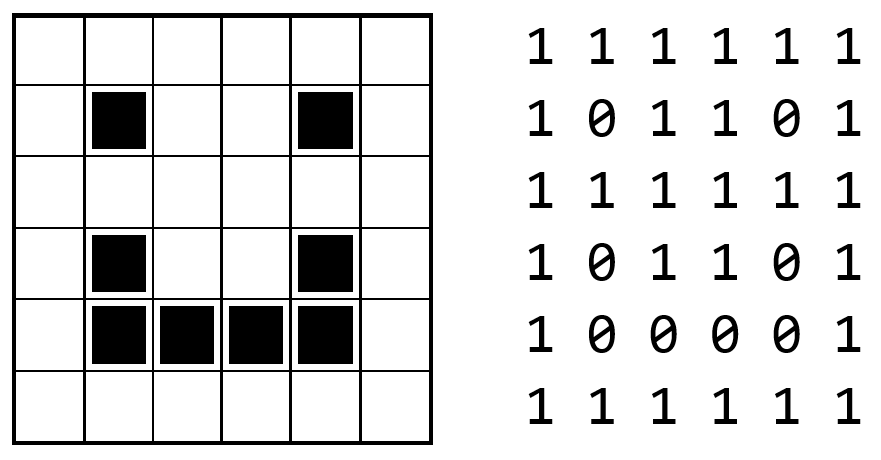
🧠 Binary Place Value Table
| Binary Digit | 2⁷ | 2⁶ | 2⁵ | 2⁴ | 2³ | 2² | 2¹ | 2⁰ |
|---|---|---|---|---|---|---|---|---|
Example: 1101 |
1 | 1 | 0 | 1 |
➡ 1×8 + 1×4 + 0×2 + 1×1 = 13
Fill out the rest of the table and calculate what value is in binary: (final value should be 25)
🔁 SECTION 2: Converting Between Binary & Decimal
🔄 Decimal to Binary (Divide by 2 Method)
Steps:
- Divide the number by 2
- Record the remainder
- Repeat until the quotient is 0
- Read the remainders bottom to top
Example: Convert 25 to Binary
- 25 ÷ 2 = 12 R1
- 12 ÷ 2 = 6 R0
- 6 ÷ 2 = 3 R0
- 3 ÷ 2 = 1 R1
- 1 ÷ 2 = 0 R1
➡ Binary:11001
🔁 Binary to Decimal
Example:
1101 = 1×8 + 1×4 + 0×2 + 1×1 = 13
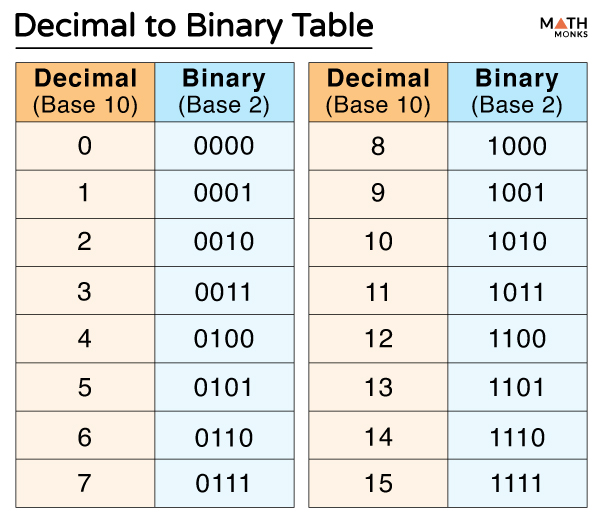
Convert the following decimals into binary: 10, 15, 17
🔎 SECTION 3: Binary Search vs Linear Search
📘 What is Binary Search?
Binary search is much faster than linear search for large datasets. It’s often referred to as a “divide and conquer” algorithm.
Steps:
- Check the middle element
- If it’s the target, return it
- If not, search the left or right half
- Repeat until found or empty
⚠️ Limitations of Binary Search
- 🚫 List must be sorted
- 😵 Not useful for very small datasets
- 🧩 A bit more complex to code
🔁 Comparison with Linear Search
| Feature | Binary Search | Linear Search |
|---|---|---|
| Requires sorted? | ✅ Yes | ❌ No |
| Speed (steps) | Fast – log₂(n) steps | Slow – up to n steps |
| Example (100 items) | ~7 steps | Up to 100 steps |
| Best for… | Large, sorted data sets | Small or unsorted lists |
📚 Real-Life Analogy
- Instead of flipping one page at a time, you open the dictionary in the middle.
- If the page shows words starting with "M", you go left.
- If it shows "Z", you still go left.
- Eventually, you land on "binary" in just a few steps — even in a thick dictionary!
🌍 Real-World Applications
- Search engines use it in indexing
- Databases (e.g., search by name or ID)
- Games (search sorted object arrays)
- Phonebook/contact search
⚖️ Pros & Cons
Binary Search
- ✅ Fast for large datasets
- ✅ Scalable
- ❌ Needs sorted data
- ❌ More complex
Linear Search
- ✅ Simple to implement
- ✅ Works on anything
- ❌ Very slow for large lists
Given the sequence of numbers, how would you search for the number 18? `[3, 6, 9, 12, 15, 18, 21, 24]`
⏱️ Time Complexity of Binary Search
Binary search is efficient because it divides the search space in half with every step. Here’s how its time complexity breaks down:
- 🧠 At each step, we eliminate half of the remaining elements.
- 🧮 This “halving” continues until there’s only one element left.
- ✨ This gives us a logarithmic number of steps — specifically:
Time Complexity: O(log₂ n)
Where n is the number of elements in the list.
Why O(log n)?
If we start with n items:
- After 1 comparison → n/2 items left
- After 2 comparisons → n/4 items left
- After 3 comparisons → n/8 items left
- …
- After
kcomparisons → 1 item left
This means:
n / (2^k) = 1 → 2^k = n → k = log₂(n)
✅ So in the worst case, binary search takes about log₂(n) steps to find the target (or determine it’s not there).
This makes it much faster than linear search (O(n)), especially on large datasets!
🐍 Binary Search in Python
# Define the binary search function
def binary_search(arr, target):
    # Set the left and right bounds of the list
    left, right = 0, len(arr) - 1

    # Continue the loop while the bounds have not crossed
    while left <= right:
        # Find the middle index
        mid = (left + right) // 2
        print(f"Checking index {mid}: {arr[mid]}")  # Debug print

        # If the middle value is the target, return the index
        if arr[mid] == target:
            return mid
        # If the target is greater, search the right half
        elif arr[mid] < target:
            left = mid + 1
        # If the target is smaller, search the left half
        else:
            right = mid - 1

    return -1  # If not found, return -1

# Example list
numbers = [1, 3, 5, 7, 9, 11, 13]

# Search for the number 7 in the list
print(binary_search(numbers, 7))  # Output: 3
🌐 Binary Search in JavaScript
// Define the binary search function
function binarySearch(arr, target) {
    // Set the left and right bounds of the list
    let left = 0;
    let right = arr.length - 1;

    // Loop while the bounds haven't crossed
    while (left <= right) {
        // Find the middle index
        let mid = Math.floor((left + right) / 2);
        console.log("Checking index:", mid, arr[mid]); // Debug print

        // If the middle value is the target, return the index
        if (arr[mid] === target) {
            return mid;
        // If the target is greater, search the right half
        } else if (arr[mid] < target) {
            left = mid + 1;
        // If the target is smaller, search the left half
        } else {
            right = mid - 1;
        }
    }

    // If the target is not found, return -1
    return -1;
}

// Example list
let numbers = [1, 3, 5, 7, 9, 11, 13];

// Search for the number 7 in the list
console.log(binarySearch(numbers, 7)); // Output: 3
🏠 HOMEWORK HACK:
🧠 PART A: Binary Breakdown
Convert the following decimal numbers into binary, and then explain the place values used:
4219100
For each one:
- Show the division-by-2 steps
- Show the binary result
- Break it down using the place value table
💡 PART B: Binary to Decimal Sprint
Convert these binary numbers into decimal:
10101010011110011
Explain the place values and your math for each!
🔎 PART C: Binary Search in Action
You’re given a sorted list:
[3, 6, 9, 12, 15, 18, 21, 24, 27, 30, 33]
Tasks:
- Search for
18 - Search for
33 - Search for
5(not in list!)
For each:
- Show the steps taken during the binary search
- How many comparisons were made?
- Was the target found or not?
🔠 PART D: Binary Search with Strings
You’re given a sorted list of words:
["apple", "banana", "carrot", "dragonfruit", "fig", "grape", "kiwi", "mango", "orange", "peach", "watermelon"]
Tasks:
- Search for
"mango" - Search for
"carrot" - Search for
"lemon"(not in list!)
For each:
- Simulate binary search steps
- Show each comparison made
- How many comparisons until found (or not found)?
✅ Free response questions 2-3 sentences each:
- Why is binary search more efficient for large data than linear search?
- What happens if the list isn’t sorted and you try to use binary search?
- Could you use binary search in a video game leaderboard or streaming service search bar? Why or why not?